

Actions: Assertions
Assertions are the checkpoints of your tests: they verify that the page actually looks and behaves the way it should after your interactions. An interaction that "works" proves nothing by itself — an assertion proves the outcome. You add assertions from the Assert tab of the action picker (⌘K in the visual editor).
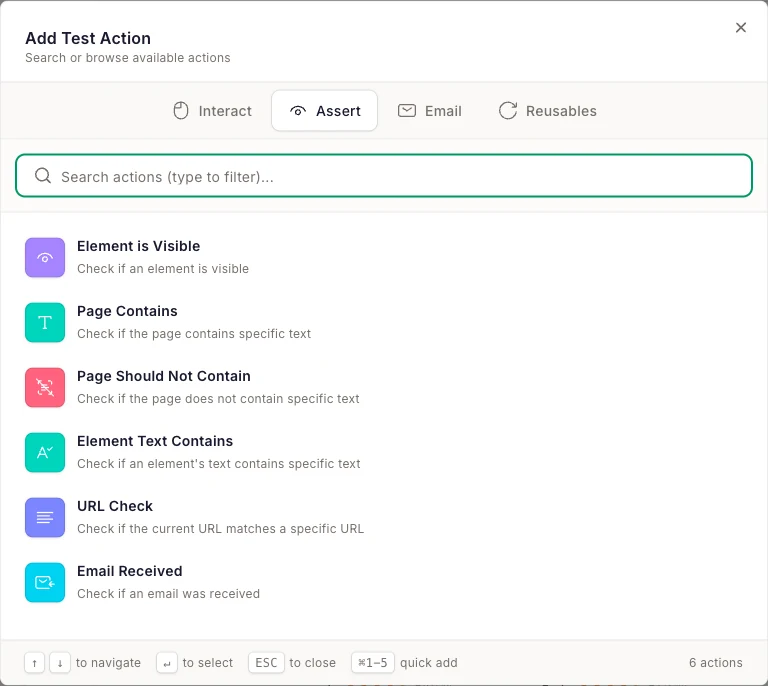
Summary
| Action | What it checks | Needs a target element |
|---|---|---|
| Element is Visible | An element is visible on the page | Yes |
| Page Contains | The page contains specific text | No |
| Page Should Not Contain | The page does not contain specific text | No |
| Element Text Contains | A specific element's text contains a value | Yes |
| URL Check | The current URL matches an expected URL | No |
| Email Received | An email arrived at a temp inbox | No |
| AI Check | A yes/no question about the page's text, answered by AI | No |
Element is Visible
Checks that an element is visible on the page.
- Target: the element to look for, selected in the live preview.
Use it to confirm structural outcomes: the success banner appeared, the modal opened, the "Add to cart" button rendered. Because it matches the element visually, it works even when the text inside changes.
Page Contains
Checks that specific text appears anywhere on the page.
- Text: the string to find.
The simplest, most readable assertion: after submitting a form, assert the page contains "Thanks for your order". Prefer text that's unique to the success state — "Submit" probably appears on the failure state too.
Page Should Not Contain
Checks that specific text does not appear on the page.
- Text: the string that must be absent.
The negative twin of Page Contains. Use it to catch error leakage: after a successful login, assert the page does not contain "Invalid credentials"; on a production smoke test, assert it doesn't contain "Exception" or "404".
Element Text Contains
Checks that a specific element's text contains a value.
- Target: the element to inspect.
- Text: the expected substring.
Tighter than Page Contains — use it when the same text could legitimately appear elsewhere. Example: assert the cart badge (not just anywhere on the page) contains "2".
URL Check
Checks that the browser's current URL matches an expected URL.
- URL: the expected URL.
Use it to confirm redirects and navigation: after login you land on /dashboard, after checkout you reach /order/confirmation. Pairs well with multi-page flows — see Multi-Step Workflows.
Email Received
Checks that an email arrived at one of your temporary inboxes — optionally containing specific text.
- Address: the temp email address to watch (typically the one created earlier in the test).
- Content: optional text that must appear in the email body.
This assertion also appears on the Email tab. Use it to verify your app actually sent the welcome email, the receipt, or the password-reset message. Full details and a worked example in Email Testing.
AI Check
Asks a yes/no question about the page and has an AI decision model answer it.
- Question: pick a suggested preset (e.g. "User is logged in", "Order is confirmed", "Validation error is visible",
Cart contains {count} item(s)), search all presets by category, or write your own free-form question — e.g. "Is the shipping cost shown in the order summary?". As you type or pick, a live verdict ("Yes · 96%", "Would fail on this page · 4%", "Unclear · 55%") shows what the AI thinks of the current page, so you can sharpen a vague question before saving it. - Params: presets with placeholders, like the cart count above, take a value you fill in.
- Fail if uncertain (under Advanced): off by default. Turns a Needs review result (below) into a hard failure.
- Timeout: how long the step keeps re-checking, 3–60 seconds, default 10.
Not a visual check
Under the hood, the check runs as soon as the step starts and re-evaluates every 2 seconds while the page keeps changing (up to 15 times), so a page that's still loading doesn't cause a false negative. The model returns a probability the answer is yes: 80% or higher passes, 20% or lower fails, and anything in between is a Needs review result — the step shows amber in the report, the run itself stays green, and the report shows exactly what the AI read from the page. If the AI service is temporarily unavailable, the step is also marked Needs review (or fails, with Fail if uncertain on). Each test allows up to 10 AI checks, and every one runs in each browser of the run.
Write questions that are specific and observable from text, not vague impressions: "Is there an order number on the page?" is answerable; "Does the page look right?" is not. If you find yourself asking two things at once — "is the user logged in AND does the cart have 2 items?" — split it into two AI Check steps. The wording is locked in once you save the step, so get it right in the live-verdict preview first.
Which assertion should I use?
- Verifying an outcome message → Page Contains.
- Verifying something didn't go wrong → Page Should Not Contain.
- Verifying a specific component updated → Element Text Contains or Element is Visible.
- Verifying navigation happened → URL Check.
- Verifying email was sent → Email Received.
- Verifying an outcome in plain words when the exact text or element may change → AI Check.
End every test with an assertion